Insights / Design
The best AI tools for UX design in 2026, by job, with prices and pitfalls
In short
- AI is useful in UX for narrow, checkable jobs such as transcription, tagging, first-draft screens, prototype code and analytics summaries. It is weak at judgement, research with real people and accessibility beyond the basics.
- Nielsen Norman Group's October 2026 survey of 521 UX practitioners found output quality (54%) and data security (50%) were the biggest barriers to using AI at work.
- Pick tools by job in the UX process. Research repositories, UI generators, prompt-to-app builders, testing platforms, analytics, accessibility checkers and review tools solve different problems.
- Prices change often. As of October 2026 several tools list no public price at all, and others bill in US dollars or euros, so check the vendor page before you budget.
- TEO's Five Gates set where a person must sign off: consent and data, real users, evidence, accessibility against WCAG 2.2 AA, and the design system.
- Small teams can start with free tiers and one paid generator. Larger teams should choose on data handling, accuracy evidence and design system support first.
The AI tools worth using for UX design in 2026 are the ones that do one narrow, checkable job well: transcribing and tagging research, generating first-draft screens, turning a design into prototype code, summarising analytics and catching basic accessibility failures. None of them replaces research with real people or a designer's judgement, and the evidence from 2024 to 2026 is consistent on that point.
An AI tool for UX design is software that uses a generative or machine learning model to produce, analyse or check part of the user experience work, such as research notes, interface layouts, prototype code, copy or accessibility findings.
This guide sorts the tools by the job they do in the UX process, lists what they cost as of October 2026 from each vendor's own pricing page, and sets out where we think a person has to stay in charge.
What is AI actually good at in UX design today?
AI is good at speed on narrow tasks: transcription, tagging, summarising, generating options and writing first-draft code. Nielsen Norman Group's 2025 review of AI design tools found that single-task features were the most useful and the ones designers actually used day to day. Broad "design it for me" generators were better suited to ideation than to finished work.
The clearest recent evidence is Nielsen Norman Group's October 2026 survey of UX practitioners. It had 521 complete responses, collected between 24 August and 11 September 2026, from a convenience sample, so it may not represent the whole field. Over 99% of respondents had access to generative AI at work, and 66% used at least one agentic tool. Among respondents who did each task, 73% often or always used AI for writing code, 69% for desk research and 67% for analysing their own research data.
The same survey shows where practitioners draw the line. 61% had never used AI for interviewing users and 51% had never used it for testing designs with users. Only 11% had used AI interviewers and 11% had used synthetic users.
In our work, the useful pattern looks like this:
- Admin around research. Transcripts, first-pass tags and session summaries.
- Options at the start. Ten rough layouts to react to, faster than drawing them.
- Realistic content. Nielsen Norman Group's December 2025 piece on prompting recommends giving tools realistic mock data, which also makes prototypes far better to test with.
- Prototype code. Getting an idea clickable in a browser so people can try it.
- Copy alternatives. Nielsen Norman Group found that giving a chatbot existing copy as a style sample, and asking for several alternatives, works better than a single tone word.
What is AI still bad at in UX?
AI is still weak at judgement, at representing real users and at reliability. Nielsen Norman Group's 2026 survey found output quality was the top barrier to AI use (54%), followed by data security and privacy (50%), and unreliable output that needs checking was the most common complaint in written comments. Generated layouts also tend to be generic and do not respect a design system well.
Generated layouts are generic, and prompts matter more than tools
Nielsen Norman Group's 2025 status update found Figma's First Draft produced generic layouts that barely changed across prompts, and that current tools did not support design systems well. Its December 2025 article tested Figma Make, Lovable, Bolt and ChatGPT and found that vague prompts produced what the author called a "Frankenstein layout": clutter, repeated elements and illogical content order. Detailed prompts with precise design terms, visual references, mock data and code snippets did much better.
The practical lesson: the quality of a generated screen depends mostly on the person writing the brief. A strong designer with a generator moves faster. A weak brief with a generator produces confident-looking noise.
AI review tools are often less accurate than they look
In January 2026 Nielsen Norman Group summarised Baymard Institute's tests of AI for UX evaluation. In Baymard's 2023 test, GPT-4 had a 20% accuracy rate on 12 webpages, roughly 80% of its recommendations were false positives, and it found only 14% of the UX issues present in the screens. The same article cites Microsoft researchers in March 2025 finding accuracy between 50% and 70% across four AI tools. Baymard's own UX-Ray tool only checks guidelines where its AI reaches at least 95% accuracy, which covers 154 of its 700+ ecommerce guidelines.
That is the right instinct. An AI review that is right seven times out of ten still hands you three bad recommendations, and you cannot tell which three.
Synthetic users narrow the answers
Nielsen Norman Group published a comparison in October 2026. It asked 120 synthetic respondents and 604 human professionals the same open question. Both groups reached the same broad conclusion, but humans produced more than 50 distinct labels while synthetic respondents collapsed onto about a dozen. 84% of synthetic respondents used UX terminology against about 70% of humans, a statistically significant gap. The authors' verdict: "Research with synthetic users is still not user research."
A 2025 Nielsen Norman Group review of three studies on AI-simulated behaviour reached a similar view: synthetic users capture general trends but not the size of effects or the natural variation between people.
Accessibility beyond the basics
Generated code gets some accessibility right and misses the harder parts. A 2025 study by Suh and colleagues compared GPT-4o and another model with human-written code and found the models often produced more accessible code for basics like colour contrast and alt text, but struggled with more complex issues such as ARIA attributes. A separate 2025 study, CodeA11y, observed 16 developers without accessibility training and found that, using AI assistants, they often failed to ask for accessibility, skipped manual steps such as replacing placeholder attributes, and could not verify compliance.
Which AI tools help with UX research and synthesis?
For research, the most useful AI sits inside a research repository that already holds your recordings, notes and survey responses. Dovetail and Condens both transcribe, tag, cluster and summarise research data, and let you ask questions across it. They save hours of admin, but the researcher should still read the raw material and own the conclusions.
- Dovetail. As of October 2026 its pricing page lists two plans: Free at $0 per user per month, covering one channel and one project with basic AI chat and summaries, and Enterprise at a custom price with AI agents, AI clustering, semantic search and translation into 75 languages. The jump between free and a sales conversation is large for a small team.
- Condens. Priced in euros: Lite from €15 a month for one contributor, Business from €500 a month paid yearly with five contributors, and Enterprise on request. AI transcription, suggested tags and session summaries start on Lite. Condens offers data hosting in the EU or US on all plans, which matters for UK teams with participant recordings.
Nielsen Norman Group's April 2026 guidance on analysis is a good rule for both: AI can assist analysis, and the researcher should lead it. Treat the AI as a thought partner, and keep interpretation with the researcher.
Which AI tools generate UI designs and wireframes?
UI generators turn a text prompt, sketch or screenshot into editable screens. The main options in 2026 are Figma's AI features including Figma Make, Google's Stitch, Uizard, UX Pilot and Visily. They are strongest for early exploration and weakest at staying consistent with an existing design system.
- Figma (including Figma Make). Figma Make generates prototypes and web apps from prompts, and "Make kits" can sync npm packages, library styles and guidelines so output uses your components. Figma lists Figma Make in its Professional plan. As of October 2026, a Professional Full seat is $16 a month billed annually ($20 monthly), with 3,000 AI credits, and the free Starter plan includes up to 500 AI credits a month. Figma says its agent is free during beta.
- Google Stitch. A Google Labs tool that generates mobile and web UIs from prompts. Google relaunched it as a "vibe design" tool on 19 March 2026, with an AI canvas, voice input and an MCP server and SDK for connecting other tools, as reported by TechRadar. We could not find a published price on Google's own pages.
- Uizard. Generates screens, themes and wireframes from text and scans screenshots and sketches. Free gives 3 AI generations a month; Pro is $12 a month and Business $39 a month, both billed annually.
- UX Pilot. Generates screens, wireframes and user flows from prompts, sketches or a PRD, can import Figma components, and exports to Figma or code. It has a free plan, with paid plans from $14 a month.
- Visily. Generates screens, components, diagrams and themes, with a hi-fi and lo-fi switch. Starter is free with 300 AI credits a month, Pro is $14 per editor per month and Business $29 per editor per month billed annually.
A note on history: Nielsen Norman Group tested Uizard and UX Pilot in April 2024 and found inconsistent output and colour palettes that needed a designer's knowledge to fix. Products have moved on since then, so judge them on a trial with your own brief.
Which AI tools turn designs into working prototypes?
Prompt-to-app builders, such as v0, Lovable and Bolt, generate working front-end code from a description, and general assistants such as Claude and ChatGPT can write prototype code and critique flows. They are the quickest way to put a clickable idea in front of users. The code needs review before it goes anywhere near production.
- v0 (Vercel). Free plan with a limit of 7 messages a day; Plus at $30 per user per month and Business at $100 per user per month, both including $30 of monthly credits per user. Business opts out of model training by default, which is worth knowing if you paste client work into it. Prices are in US dollars and exclude VAT.
- Lovable. Credit-based. On monthly billing Pro starts at $25 a month for 100 credits and Business at $50 a month for 100 credits, rising with credit volume. Annual billing gives two months free.
- Bolt. Free gives 1 million tokens a month. Pro is $18 a month and Teams $27 per member per month, both billed annually. Bolt says larger projects use more tokens per message, because it syncs the project's files to the AI.
- Claude and ChatGPT. General assistants used for code, copy, critique and research planning. Anthropic lists Claude Pro at $20 a month in the US, with local pricing where supported. We could not get a current price from OpenAI's own pricing page, so check it before you budget.
These builders produce something that looks finished. That is the risk. If the prototype will be shown to real users, apply the accessibility gate below. If it will become the product, have the code reviewed against your design system and architecture.
Which AI tools help with usability testing and analytics?
Testing platforms now use AI to build studies, run moderated sessions and summarise results, while analytics tools use it to summarise session recordings and answer questions about behaviour data. Maze and Lyssna cover testing; Contentsquare (which now includes Hotjar) and Microsoft Clarity cover behaviour analytics.
- Maze. Its pricing page lists an AI study builder (with limits) and automated reporting on all plans, and puts the AI moderator and interview studies on Enterprise. The page shows no prices; you contact sales.
- Lyssna. Card sorts, tree tests, first-click, five-second, prototype and live website tests, surveys and interviews. Free covers quick studies with three seats. Growth is $166 a month and adds AI follow-up questions and AI summaries.
- Contentsquare and Hotjar. Hotjar merged into the Contentsquare Group on 1 July 2025, and Hotjar's heatmaps, recordings and surveys now sit inside Contentsquare. Hotjar's pricing page now redirects there. The Free plan covers up to 200,000 monthly sessions. Growth is listed from $39 a month billed yearly ($49 monthly) and adds Sense AI chat, session replay summaries and heatmap summaries. UK customers on Growth are billed in euros.
- Microsoft Clarity. Free, with no limit on traffic. Its Copilot answers questions about your dashboard data in plain language and can open recordings with its filters applied. Microsoft's own documentation warns that generative AI can misinterpret data, so verify important findings.
AI summaries of recordings are a fast way to find where to look. They are a poor substitute for watching the sessions that matter.
Which tools check accessibility, and can AI do it alone?
Automated checkers such as Deque's axe and Stark catch a large share of accessibility issues quickly, and Deque now adds an AI assistant. No automated tool covers all of WCAG 2.2, so manual testing with keyboards and screen readers is still required. Deque says axe DevTools can find "up to 80% of issues".
- axe (Deque). axe-core, the axe DevTools browser extension and the axe DevTools Linter are listed as free tools. Its platform also includes axe DevTools, axe Monitor and axe Auditor, an axe MCP server for fixes in the IDE and an AI chatbot, Axe Assistant. Deque does not publish prices on the page.
- Stark. Covers design files (Figma, FigJam and Sketch plugins), code repositories and live sites through browser extensions. As of October 2026 the Premium Pack starts at $198 per user per year (minimum three seats) and team plans start at $2,500 a year. A free team account is available.
The standard to test against is WCAG 2.2, the current W3C Recommendation dated 12 December 2024, which added nine new success criteria. UK public sector websites and apps must meet WCAG 2.2 AA, according to GOV.UK. Many private sector buyers ask for the same. At AA, normal text needs a contrast ratio of at least 4.5:1.
Which tools review UX automatically?
Automated UX review tools score a screen against a framework and suggest fixes. They are useful as a fast first pass, provided the vendor can show what the tool checks and how accurate it is. Nielsen Norman Group recommends asking vendors how they measured accuracy, what the tool cannot do, and which parts of the result come from generative AI.
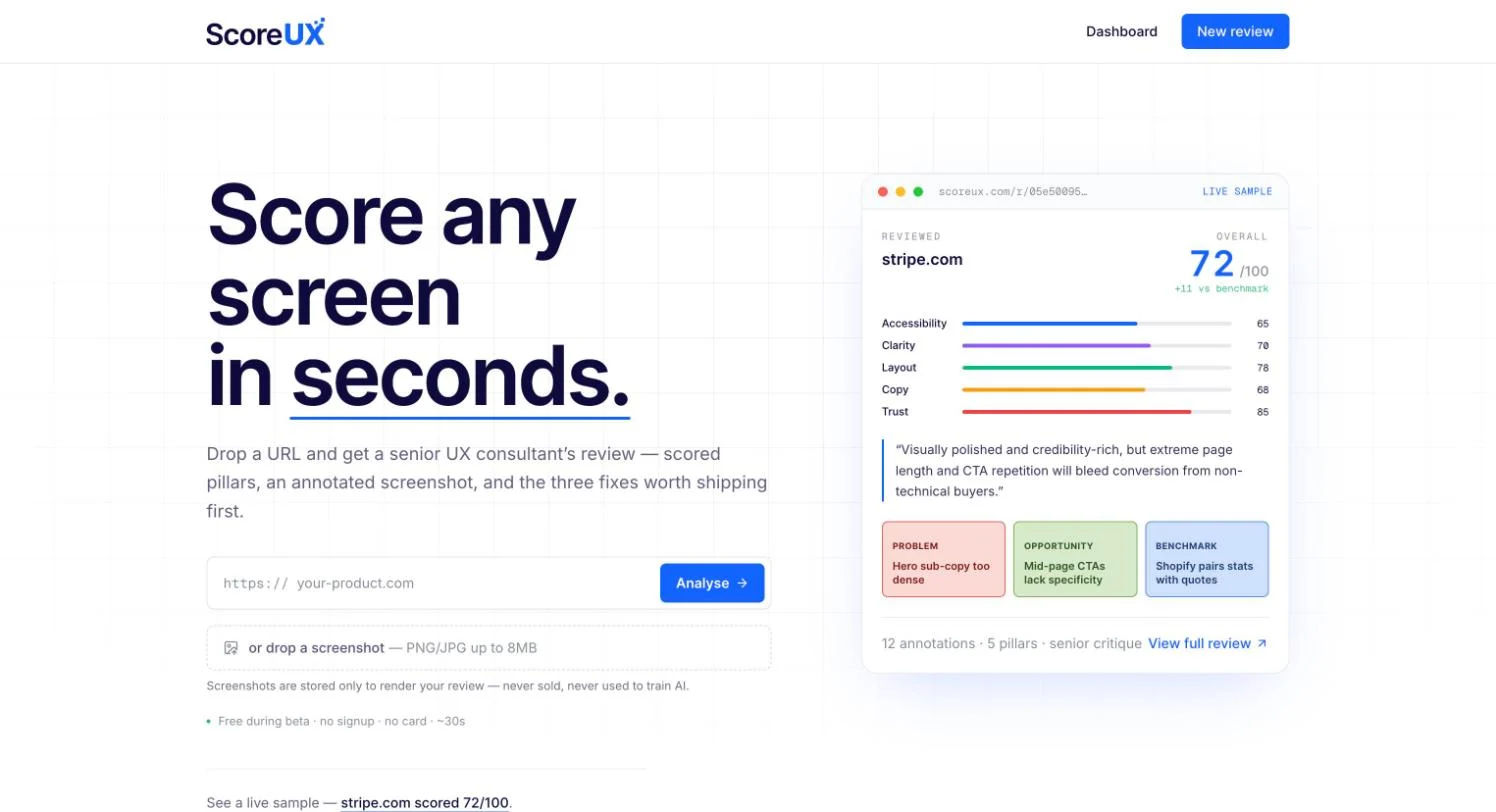
Disclosure: ScoreUX is our own product. It takes a full-page screenshot at desktop width and reviews it against five pillars, accessibility, clarity, layout, copy and trust, weighted to the goal you choose. It returns an annotated screenshot, a ranked list of fixes and a print-ready PDF. The framework is ours and the analysis runs on a vision model. Screenshots are stored only to render your review. It is free during the beta.
We would hold ScoreUX to the same test as any other tool. An automated review does not know your business or your users. For decisions that matter, a person needs to weigh the findings, which is the point of a proper UX audit.
How do the main AI tools for UX compare?
The table below summarises each tool's job, its entry price as listed on the vendor's own site as of October 2026, and the main thing to watch. Prices are as shown by the vendor, mostly in US dollars and often excluding VAT; check before you buy.
| Tool | Good for | Pricing (as of October 2026) | Watch out for |
|---|---|---|---|
| Dovetail | Research repository, AI summaries and clustering | Free $0; Enterprise custom | Large gap between free and Enterprise |
| Condens | Research repository with EU hosting option | Lite from €15/month; Business from €500/month paid yearly | Advanced AI features sit on Business |
| Figma (Make and AI) | AI inside your existing design files | Starter free; Professional Full seat $16/month billed annually ($20 monthly), 3,000 AI credits | Credits shared across features; generic output from vague prompts |
| Google Stitch | Fast UI exploration from prompts | Beta; no published price found | Pricing and terms may change |
| Uizard | Quick wireframes and screens from text or sketches | Free; Pro $12/month, Business $39/month, billed annually | Free tier allows 3 generations a month |
| UX Pilot | Screens and flows, exports to Figma or code | Free plan; paid from $14/month | Check design system import on your own files |
| Visily | Wireframes and diagrams for mixed teams | Starter free; Pro $14/editor/month; Business $29/editor/month annually | Prompt length capped by plan |
| v0 | React prototypes from prompts | Free; Plus $30/user/month; Business $100/user/month | Training opt-out by default only on Business and above |
| Lovable | Working app prototypes | Pro from $25/month (100 credits), monthly billing | Credit use grows with changes |
| Bolt | Browser-based app prototypes | Free; Pro $18/month, Teams $27/member/month, billed annually | Larger projects use more tokens |
| Claude | Code, copy, critique, research planning | Pro $20/month (US) | General tool; needs a strong brief |
| Maze | Unmoderated testing, AI study builder | No public prices; contact sales | AI moderator is Enterprise only |
| Lyssna | Usability tests and surveys | Free; Growth $166/month | AI features start on Growth |
| Contentsquare (incl. Hotjar) | Heatmaps, recordings, AI summaries | Free up to 200k sessions; Growth from $39/month billed yearly | UK billed in euros; AI on Growth |
| Microsoft Clarity | Free recordings and heatmaps with Copilot | Free | Copilot can misread data |
| axe (Deque) | Automated accessibility testing | Core tools free; paid tiers on request | Automation alone cannot prove compliance |
| Stark | Accessibility from design to code | Premium Pack from $198/user/year (3 seats min) | Team plans from $2,500/year |
| ScoreUX (our product) | Fast first-pass UX review of a screen | Free during beta | One screen at a time; needs human judgement |
What are TEO's Five Gates for using AI in a UX team?
TEO's Five Gates are the five points where a person must check and sign off AI output before it affects users or a decision: consent and data, real users, evidence, accessibility and the design system. Everything between the gates can be as fast and automated as you like. We use this framing because it makes AI adoption a question of where to put review, which most teams can answer.
- The consent and data gate. Before any research recording, transcript or customer data goes into an AI tool, check what participants agreed to and where the tool stores and processes data. The ICO lists innovative technology, including AI, as a high-risk indicator, and says a DPIA is required when it is combined with another risk factor. The ICO also notes its AI guidance is under review following the Data (Use and Access) Act. Prefer tools that offer UK or EU hosting and opt out of model training.
- The real users gate. No product decision rests on synthetic users or AI-generated personas alone. Use them to form hypotheses, then test with people. Nielsen Norman Group has advised against using AI to generate user data, findings or personas since 2024, and its 2026 research shows why.
- The evidence gate. Every AI finding, whether from a research summary, an analytics copilot or an automated review, must trace back to a source a person can check: a quote, a recording, a screen, a metric. If it cannot be traced, it does not go in the report.
- The accessibility gate. Every generated screen or prototype shown to users is checked against WCAG 2.2 AA, first with an automated tool and then manually with a keyboard and screen reader. The 2025 studies above show generated code gets the basics right more often than the complex parts.
- The design system gate. Generated UI is rebuilt from, or checked against, your real components and tokens before it ships. AI tools still struggle to respect design systems, and an interface assembled from near-miss components is how products start to look inconsistent.
The gates are cheap to run when they are built into the workflow from the start, for example as a checklist in your discovery sprint or a column on the backlog.
How should you choose AI tools for your team?
Choose by the job you need done and the data you will put in, then by price. A solo founder needs one generator and free testing tools. A product team needs tools that handle participant data properly and work with its design system. An enterprise team needs accuracy evidence, contracts that rule out model training and hosting it can defend to procurement.
| Team | Start with | Add when | Main risk |
|---|---|---|---|
| Founder or solo designer, pre-product | One prompt-to-app builder or UI generator on a free or entry plan; Microsoft Clarity; axe browser extension | You have real users to test with: Lyssna Free or similar | Shipping a polished prototype that has never been tested or audited |
| Small product team (2 to 10) | Figma with AI credits; a research repository with EU hosting; a testing tool | Volume of research justifies paid AI analysis | Pasting participant data into tools without checking consent and hosting |
| Scale-up with a design system | Figma Make kits or tools that import your components; Stark or axe in the pipeline | Generated UI needs to match coded components | Drift between generated screens and the real system |
| Enterprise or regulated | Tools with documented accuracy, training opt-out and contractual data terms | Procurement and a DPIA are complete | Accepting "AI-powered" as proof of quality |
Three questions settle most choices:
- What job will it do, and how will we check the result? If nobody can check it, it should not be in the workflow.
- What data goes in, and where does it go? Read the plan page carefully. Training opt-out is often a higher tier.
- Does it work with what we already have? A generator that ignores your components creates rework for developers.
Nielsen Norman Group's State of UX 2026 expects "AI fatigue" this year and argues value is moving toward judgement and research-informed understanding. That matches what the tools can and cannot do. Use them to clear the admin and get to options faster, then spend the time saved on the parts only people can do.
Where does a design and engineering studio fit?
AI tools make the first draft cheaper. They do not make the decisions behind it, and they do not join design, accessibility and code together on their own. That joining is what our product design work is for: research, journeys, interfaces and design systems shipped as code-ready libraries, designed knowing how they will be built. If you already have a product and want an independent read on it, our Platform Health Check is a fixed-fee audit across UX, code, architecture, performance, security and delivery, from £495.
If you are deciding which AI tools to bring into your product team, or want a second opinion on something a generator built, talk to us.
Common questions
Can AI replace a UX designer in 2026?
No. Nielsen Norman Group's 2025 review found prototype generators suited to ideation and short of replacing experienced designers, and its 2026 survey found unreliable output was the most common complaint. AI speeds up parts of the work, but someone still has to judge what is right for the users and the business.
What is the most useful AI tool for UX research?
For most teams it is the AI inside a research repository, such as Dovetail or Condens, which transcribes, tags and summarises sessions. These save time on admin. A researcher should still read the raw data and own the conclusions.
Are synthetic users a substitute for user research?
No. A Nielsen Norman Group study published in October 2026 found synthetic respondents reached the same broad conclusion as humans but with far less variety of answers. Use them for early hypotheses, then test with real people.
Is AI-generated UI code accessible?
Partly. A 2025 study found language models often handle basics like colour contrast and alt text, but struggle with more complex issues such as ARIA attributes. Every generated screen still needs automated checks plus manual testing against WCAG 2.2 AA.
Do I need a DPIA to use AI tools on user research data?
Possibly. The ICO lists innovative technology, including AI, as a high-risk indicator, and says a DPIA is needed when it is combined with another risk factor. If you are uploading recordings or personal data from research participants into an AI tool, assess it before you start.
Is Figma Make included in Figma plans?
Figma lists Figma Make in its Professional plan. As of October 2026 a Professional Full seat is $16 a month billed annually ($20 monthly), with 3,000 AI credits a month shared across Figma's AI features.
Should a startup use Lovable, Bolt or v0 instead of hiring a designer?
They are good for testing an idea quickly with a working prototype. Nielsen Norman Group found vague prompts to these tools produced cluttered, inconsistent layouts, so the quality depends on the person prompting. Before real users or investors rely on the product, have the design, accessibility and code reviewed.
What should I ask an AI UX review vendor?
Ask how they measured accuracy, what the tool cannot do, and which parts of the result come from generative AI. Nielsen Norman Group recommends asking exactly these questions. Do not accept "AI-powered" as proof of quality.
Sources
- Nielsen Norman Group, AI in UX, Work Is Faster, But Practitioners Have Mixed Feelings (October 2026)
- Nielsen Norman Group, AI Design Tools Are Marginally Better, Status Update (May 2025)
- Nielsen Norman Group, AI UX-Design Tools Are Not Ready for Primetime (April 2024)
- Nielsen Norman Group, Prompt to Design Interfaces, Why Vague Prompts Fail (December 2025)
- Nielsen Norman Group, Demand Accuracy in Your AI Tools, Lessons from Baymard Institute (January 2026)
- Nielsen Norman Group, Synthetic Users vs. Human Respondents (October 2026)
- Nielsen Norman Group, Evaluating AI-Simulated Behavior (August 2025)
- Nielsen Norman Group, Use AI Responsibly in Analysis (April 2026)
- Nielsen Norman Group, ChatGPT and Tone (March 2024)
- Nielsen Norman Group, State of UX 2026
- Suh et al., Human or LLM? A Comparative Study on Accessible Code Generation Capability (arXiv, 2025)
- Mowar et al., CodeA11y, Making AI Coding Assistants Useful for Accessible Web Development (arXiv, 2025)
- W3C, Web Content Accessibility Guidelines (WCAG) 2.2
- GOV.UK, Understanding accessibility requirements for public sector bodies
- ICO, When do we need to do a DPIA?
- ICO, Guidance on AI and data protection
- Figma pricing
- Figma pricing FAQ (AI credits)
- Figma Professional plan
- Figma Make
- TechRadar, Google unveils new vibe design tool (March 2026)
- Uizard pricing
- UX Pilot
- Visily pricing
- v0 pricing
- Lovable subscription plans
- Bolt pricing
- Claude Help Center, What is the Pro plan?
- Dovetail pricing
- Condens pricing
- Maze pricing
- Maze Help Center, AI features and study types
- Lyssna pricing
- Contentsquare pricing
- Contentsquare, Hotjar is now part of Contentsquare
- Microsoft Clarity
- Microsoft Learn, Clarity Copilot
- Deque, axe accessibility tools
- Stark pricing
- ScoreUX